Navigating Content Planner Printables: Understanding Features, Formats, and Fit for Your Creative Workflow
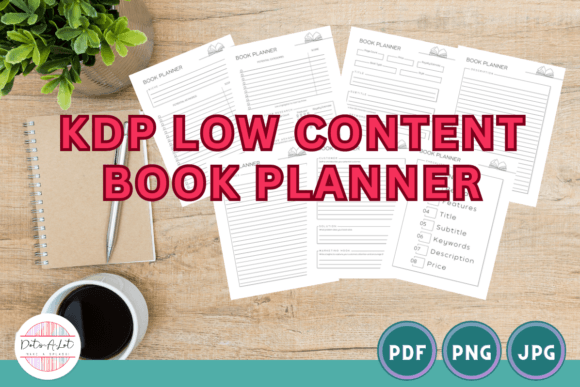
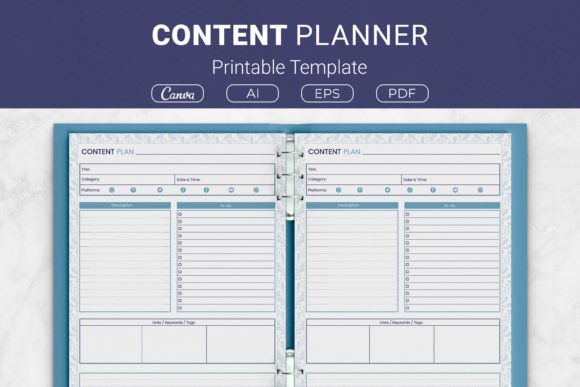
Keeping a social media presence organized often means choosing between dozens of planning methods, from slick apps to plain notebooks. A Content Planner Printable Template sits somewhere in the middle—it gives you the repeatable structure of a digital tool but exists on paper, ready to be filled in by hand. Unlike a generic blank planner, a dedicated content planner printable typically breaks down each post idea into discrete fields that mirror how social media managers think: title, category, date and time, target platforms, description, to-do list, and links or tags. The version we’ll use as a reference throughout this article includes all these sections, plus space for notes, making it a strong example of a purpose-built printed organizer.
What makes a printable template like this distinct isn’t just the layout. It’s the blend of physical tangibility and thoughtful format. Many people find that writing by hand improves recall and lowers the temptation to endlessly tweak a digital draft. At the same time, a well-designed printable enforces process without locking you into software you may not fully control. You get the prompts you need—category, platform, date—without notifications or distractions. That’s a key tradeoff to weigh when comparing a printable approach to an app or a basic Excel sheet.
Comparing Printable Planners to Digital Scheduling Tools and Spreadsheets
When you evaluate how a Content Planner Printable Template stacks up against other planning resources, the differences are rarely about simple quality. It’s about which friction points you can live with and which ones slow you down.
Digital scheduling platforms (such as native social media management suites) excel at automation. They can queue posts, suggest optimal posting times, and provide analytics. The downside? They often encourage over-reliance on their own UI, lock you into a subscription, and don’t always give you a quick-glance view of your overall creative strategy. A printable, by contrast, lives outside the screen. You can spread the pages across a desk, physically rearrange them, and see a month’s worth of content without clicking into menus. For solopreneurs and small teams who value deliberate, screen-free planning sessions, a printable’s limitations become an advantage.
Spreadsheets (Google Sheets, Excel) are the most customizable free alternative. You can build a tab with all the fields you’d find in a printable—title, category, platforms, links—and then sort, filter, and share. The tradeoff is that spreadsheets require constant design maintenance and can feel sterile. A Content Planner Printable Template offers a fixed, visually appealing layout that doesn’t break when you accidentally delete a formula. Many users find that a predefined printable reduces “setup fatigue” and gets them planning faster, especially for weekly batch content creation.
Structured vs. Flexible Planning: Where a Content Planner Printable Template Shines
Not all printable planners are created equal. Some are ultra-minimal, offering only a date and a few lines. Others, like the template we’re discussing, pack in specific fields: title, category, date/time, platforms, description, to-do list, links/keywords/tags, and notes. This level of structure helps in two ways. First, it acts as a checklist, ensuring you never forget to assign a platform or gather the relevant link. Second, it trains your brain to think in terms of complete post packages, making it easier to repurpose content later.
However, this structure can feel confining if you’re the kind of creator who prefers freeform brainstorming. If your planning sessions start with mind maps or you often plan video content that doesn’t fit neatly into a “title + description” box, you might find the predefined fields slightly restrictive. In those cases, the notes section becomes your friend. A good printable includes generous room for scribbles that go beyond the boxes, and the reference template allocates space exactly for that—extra ideas, shot lists, or alternative hooks.
Understanding Page Sizes and Formats for Ultimate Usability
One of the practical decisions when selecting a printable content planner is the physical size you’ll work with. The featured template comes in US Letter, A4, 7.5 x 9.25 inches, and 6×9 inches. This isn’t just a minor detail—it directly affects how and where you use the planner.
- US Letter and A4 are ideal if you want to hole-punch sheets and keep them in a standard binder, or if you prefer working on a full-size desk sheet that feels like a work document.
- 7.5 x 9.25 inches offers a compromise: large enough to write in comfortably, but small enough to fit in many tablet sleeves or a smaller bag. It feels more like a personal notebook.
- 6×9 inches is travel-friendly. It can go into a pocket planner cover or a small binder. The tradeoff is less writing space, so you might need to be more concise, but for quick daily check-ins, that’s often ideal.
Comparing formats also leads to the question of digital fillability versus true print. The package includes PDFs ready to print, as well as a Canva template link and editable AI/EPS files. If you’re someone who occasionally wants to type into the planner before printing, the Canva link and editable source files let you customize colors, add your branding, or even create a version for a client. The ability to tweak the template before committing to a print run makes it versatile for both personal use and small business applications like KDP interior publishing.
When a Printable Content Planner May Be the Right Choice—and When It Might Not
No single planning tool fits everyone, and honest evaluation means looking at your core habits. Use a Content Planner Printable Template if:
- You find apps distracting and want a tangible, offline space to plan.
- You prefer a repeatable, consistent format that you can fill out quickly without setting up new documents each week.
- You create content for multiple platforms and need a clear spot to note where each post will go.
- You enjoy the ritual of print planning and the sense of completion that comes with a filled page.
- You’re running a small KDP business or need a clean, ready-to-use interior that customers can immediately print and use.
On the other hand, you might look at alternatives if:
- You need real-time collaboration with a team spread across locations. A digital tool with live updates will serve you better than a physical sheet, even if you scan or share PDFs.
- Your content relies heavily on dynamic media (things like live video scheduling, story sequences that change on the fly). A printable can track the plan but can’t auto-publish.
- You strongly prefer minimalist, blank-page journaling. A detailed template could feel like paperwork rather than inspiration.
- You need integrated analytics. A printable won’t tell you which post performed better; you’d need to pair it with a separate tracking method.
Real-World Scenarios: How a Content Planner Printable Supports Different Workflows
Imagine a freelance social media manager handling five clients. They could use a complex dashboard, but during client meetings, a printed Content Planner Printable Template provides a tactile, non-intimidating way to review the upcoming week. Each sheet can be dedicated to one client’s content for that week, with the “links/keywords/tags” section making handoff to a writer or graphic designer seamless. The notes area holds client feedback from the meeting, keeping everything in one place.
Another scenario: a small handmade shop owner who does all marketing themselves. They sit down every Sunday evening, print a new batch of sheets, and plan Instagram and Pinterest posts. The category field helps them quickly see the balance between product photos, behind-the-scenes, and testimonial shares. The to-do list reminds them to take new photos or write the email newsletter tie-in. Because the template has a clean, consistent layout, they can later bind the sheets into a content archive, which becomes an unexpectedly useful reference for what worked last season.
For someone building a passive income stream through KDP, the template’s multi-format offering—AI, EPS, PDF, and Canva link—means they can import the design into their publishing workflow without starting from scratch. They can adjust branding, add a few extra pages, and create a branded content planner that sells alongside other journals. Here, the decision isn’t just about personal planning; it’s about the template’s adaptability as a product component.
Key Sections and Their Strategic Value
What sets a specialized printable apart from a simple lined page is how it breaks down the planning into actionable segments. The reference template’s sections each serve a distinct purpose during the planning and execution phases.
Title and Category: These two fields work together to force clarity. A working title makes the post tangible, while a category (tutorial, promotion, engagement, storytelling) helps maintain a healthy content mix. Without categories, many creators drift toward only one type of post.
Date & Time / Platforms: This combo encourages specificity. You’re not just deciding what goes out; you’re deciding exactly where and when. For teams, this reduces the “I thought it was going on Facebook” confusion.
Description: This is the rough draft or the key message. Paired with the notes area, it lets you sketch the post’s core idea without getting lost in final copy too early.
To-Do List: Often the most overlooked but valuable real estate. Planning a post often reveals tasks: record a reel, source a statistic, resize an image. Capturing these here prevents them from cluttering another task manager.
Links / Keywords / Tags: Particularly useful for YouTube, blog, Pinterest, and SEO-driven content. Having a dedicated spot means you collect these elements at the planning stage, not as an afterthought right before posting.
Print Quality and Longevity as a Planning Partner
Since a printable lives on paper, the feel matters. Thicker paper prevents ink bleed-through, and clean, well-spaced lines improve the writing experience. The template’s design, as an open-source AI and EPS file, lets you adjust line weight or greyscale intensity before printing if you find the default too heavy or light. This kind of subtle personalization can make the difference between using a planner for two weeks and sticking with it for months.
Making an Informed Decision: Balancing Immediate Needs with Evolving Habits
No tool should be chosen in a vacuum. If you’re currently frustrated with chaotic content planning, a Content Planner Printable Template can restore order quickly because it imposes a proven structure without a learning curve. However, if you’re an experienced digital native who already has a tight Notion setup or a Trello board that actually works, introducing a paper element might create redundancy. The most effective approach is often hybrid: keep the big-picture calendar in a digital tool for sharing, but use the printable for your own weekly deep-dive planning where you need to think rather than just schedule.
Ultimately, the decision rests on how you process creative ideas. For tactile planners, visual processors, and anyone who values unplugged focus time, a thoughtfully designed printable offers something an app can’t replicate. For data-driven, collaborative, or highly automated workflows, it may serve better as a secondary brainstorming companion rather than the primary system. Knowing where you land on that spectrum will guide you toward the right resource—printable, digital, or a mix of both.